

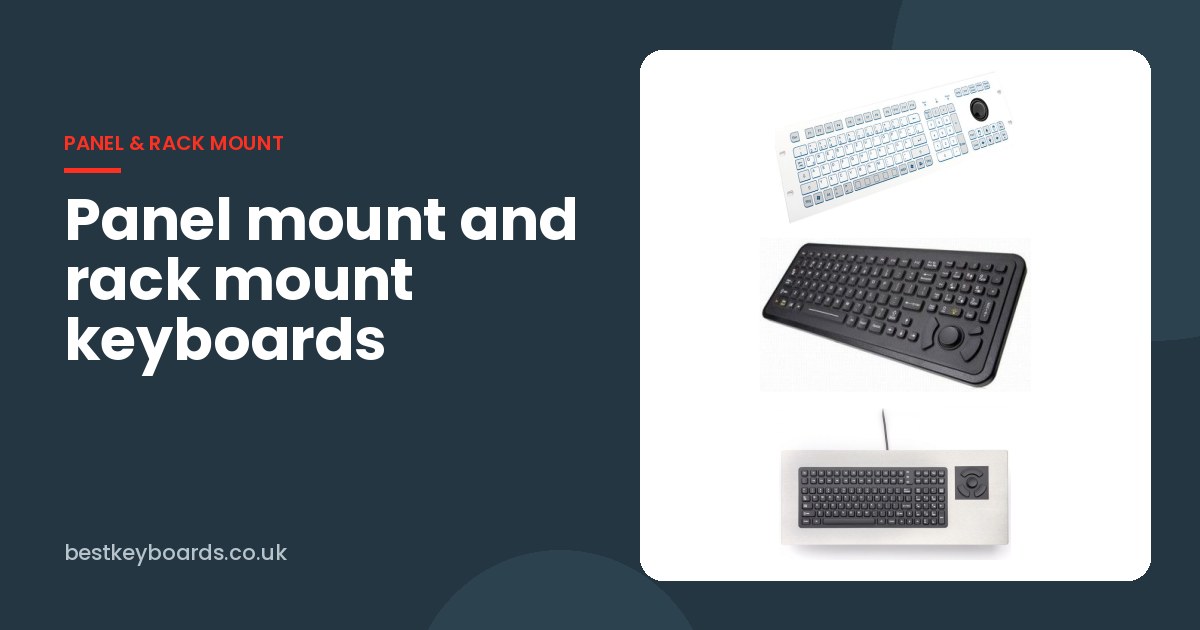
Some keyboards sit on a desk. Others become part of the equipment. In a control room, a broadcast gallery, a ship's bridge or the side of a machine, the keyboard is often built into a console or a 19-inch rack, and in those places it is expected to stay put and keep working for as long as the equipment around it does.
That changes how you choose it. A loose desktop keyboard gets knocked off, unplugged, covered in paperwork or walked off with. A panel mount or rack mount keyboard does not, but you only get one chance to get the cut-out, the sealing and the layout right. We get asked about this a lot by machine builders and system integrators, so here is how we approach it.
There are three broad ways to build a keyboard into something:
If you are designing new equipment, OEM gives you the most freedom. If you are fitting into an existing console or rack, a ready-made panel or rack mount unit saves a lot of drawing time.
Panel mount keyboards fit either from the front, with a visible bezel that sits over the edge of the cut-out, or from behind, where the panel itself becomes the frame. Front mounting is quicker to install and replace. Rear mounting gives a cleaner, flusher finish, but you need access behind the panel.
Either way, the data sheet cut-out size is the number to design to. As an example, iKey lists the SLP-102-FSR at 383.5 x 153.7 mm overall, with a panel cut-out of 348 x 118.1 mm. A few practical points we always pass on:
This is the part that catches people out. A panel mount keyboard is usually rated for the front face once it is installed, and only if it has been installed properly with its gasket. iKey's panel mount data sheets, for example, quote NEMA 4X protection "when properly installed".
You will also see a difference between static and dynamic ratings. The InduKey TKS-105c-TB38-FP-4HE data sheet is a good illustration: it lists the front at up to IP65, but IP54 under dynamic conditions. In plain terms, the keyboard is better sealed sitting still than it is while keys and the trackball are moving. If your console gets hosed down while people are working at it, ask about the dynamic rating, not just the headline one.
Rack mount keyboards are built around the 19-inch standard, which is defined in EIA-310 and internationally in IEC 60297. As ITWissen explains, the front width is 482.6 mm and one rack unit (U, or HE in German) is 44.45 mm high. That is why you see keyboards described as 1U, 3U or 4U.
There are two main styles:
Check the rack depth before you order a drawer. Rails come in different lengths, and a drawer that is too long for a shallow wall cabinet is a surprisingly common mistake.
In a built-in keyboard the pointing device is fixed, so it is worth getting right first time.
For heavy industry, iKey's PM range combines stainless steel with silicone keys. The PM-2000 is a good example: according to its data sheet it has 114 keys including two rows of function keys and a numeric pad, a stainless steel case, an integrated HulaPoint II pointer and NEMA 4X certification. There is also a PM-2000-TB trackball version.
If the keyboard is going into a public kiosk, help point or anywhere unsupervised, an all-metal keyboard is usually the safer bet. Units like the iKey PM-65-TB-SS or the RUGGED SSK-PC-D stand up to abuse that would finish off a silicone keypad.
What these have in common is long service life. A console may stay in place for ten years or more, so pick a keyboard with a stable footprint and a manufacturer that keeps it in production. Replacing a keyboard is easy. Re-cutting a console because the replacement is a different size is not.
For custom cut-outs, bezels or OEM keyboards built to a machine builder's drawing, we work with our supply and support partner Rugged Limited, who have been supplying and customising rugged keyboards for 25 years.
If you are designing a console, a rack or a machine panel, send us your drawings or requirements and we will suggest the best fit and send over data sheets and cut-out details. We usually reply within 24 hours.
You can also browse all our panel mount keyboards and rack mount and OEM keyboards.